Our team is bringing users an early Christmas present: we have just released the new version of openLCA, 2.6. You can find the updates below, with explanations.
Improved features
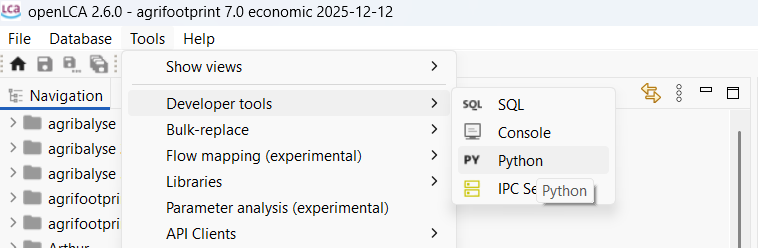
1. Improved Jython/Python integration: CodeMirror 6 editor with code completion and run keymap
openLCA now incorporates a language-specific code-completion aid that will help users typing code by displaying available options and making the workflow faster.
For example, try typing process in the python editor:

2. Improved workflow for Results
- Allow results as default providers in processes with the drag and drop function.
- Allow adding multiple impact categories and flows to results at once.
3. Other
- Check-box added for Regionalized calculations to the direct impact tab in the process editor.
- The names displayed in the Model Graph and Sankey diagram now show the country code before the name of the process, e.g. “CH – Transport, freight, lorry 7.5-16 metric ton, fleet average” instead of “Transport, freight, lorry 7.5-16 metric ton, fleet average – CH”.
- Social aspects: it is now possible to delete a set of indicators under social aspects tab, for improved user experience.
New experimental features
4. System Dynamics simulation and modelling (experimental feature)
The integration of System Dynamics to openLCA is an exciting ongoing development. This work comes as a result of several research projects in which we are exploring System Dynamics to provide a wider perspective in sustainability assessments.
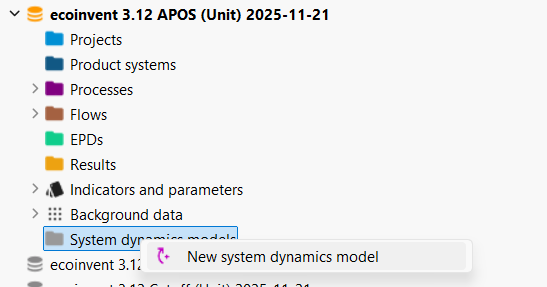
To enable it, go to File > Preferences > Experimental features > enable Support for system dynamics models. A folder for system dynamics models will appear (see picture below). From here you can import a new system dynamics model in XMILE format. For now this has only been tested with Stella Architect software.
5. Hestia import functionality with flow mapping selection and data preview
Hestia is an open data pool for farms and food products. The Hestia API client can be found under Tools > API Clients > Hestia. It is still labelled as an experimental feature:
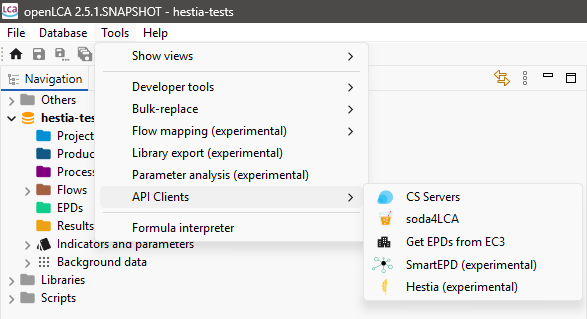
An API key provided by HESTIA is required, which you get for your user account on the Hestia platform. From there you can then search for datasets on the Hestia platform directly in openLCA, and import them using a GLAD mapping file.
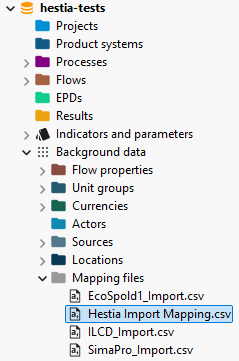
6. GLAD mapping file import support
The GLAD flow mapping format is now also supported by openLCA. Note that openLCA has supported flow mappings for some time:
Bug fixes
- Fix: direct impacts of processes now consider results that are linked as default providers in processes
- Fix: deletion of database repository
- Fix: library signing UI issues
- Fix: analysis groups: add multiple selected processes
- The direct calculation now considers results that are linked as default providers in processes.
Download the new version
Click here to download openLCA v2.6.
Once the new update is running, you can double click on a database to open it (as usual) and it will automatically upgrade to the new version.
If you have any questions or need help, contact our team, we are happy to help.